Flows in a campaign
Make a flow one of a campaign's tactics, so its contacts and emails count in the campaign's results.
What it's for
A product launch might combine a social plan, an ad set and a nurture flow. As a Marketing Automation tactic, the flow sits next to the others on the campaign, starts and finishes with them, and its emails reach the campaign report.
Before you start
- A campaign. See Campaigns.
How to add a flow to a campaign
- Open the campaign and add a Marketing Automation tactic (see Launch a Tactic).
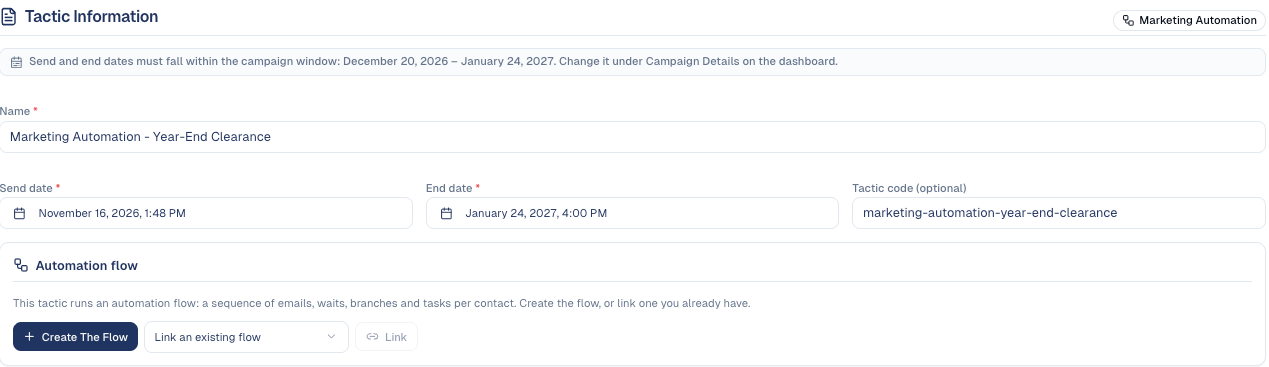
- Name the tactic, set its dates inside the campaign window, then choose Create Tactic.
-
Under Automation flow, choose Create The Flow for a new one, or pick a flow under Link an existing flow and choose Link.
-
Open Designer to build the flow as usual.
- Activate the flow: the tactic moves to Started.
Once linked, the tactic shows how many contacts are In the flow, Completed and Exited, and the flow's page shows Part of a campaign with a link back.

Good to know
- The tactic follows the flow. Activating the flow starts the tactic; archiving it completes the tactic.
- One flow per tactic, and a flow belongs to one tactic at most. Unlink frees both.
- Campaign analytics count the flow's enrolled, completed and exited contacts, its conversion rate and its emails' sends, opens and clicks.
Still stuck? Contact support.