Workflow Agents
Multi-step jobs that run themselves: research, analysis and planning that would take you an afternoon.
What it's for
A chat agent answers a question. A workflow agent carries out a whole process: researching a company, comparing it with competitors, ranking them, and producing a SWOT analysis, each step feeding the next.
You start it and come back to the result.
Before you start
- Your plan. Workflow Agents are included in the Pro and Full plans.
- Credits. Each step of a workflow uses credits, so a workflow costs more than a chat. See Usage & Billing.
How to run a workflow
- In the sidebar, choose Agentic AI → Workflow Agents.
- Browse the workflows, or filter by category.
- Read the diagram to see what it will do.
- Choose Start Workflow.
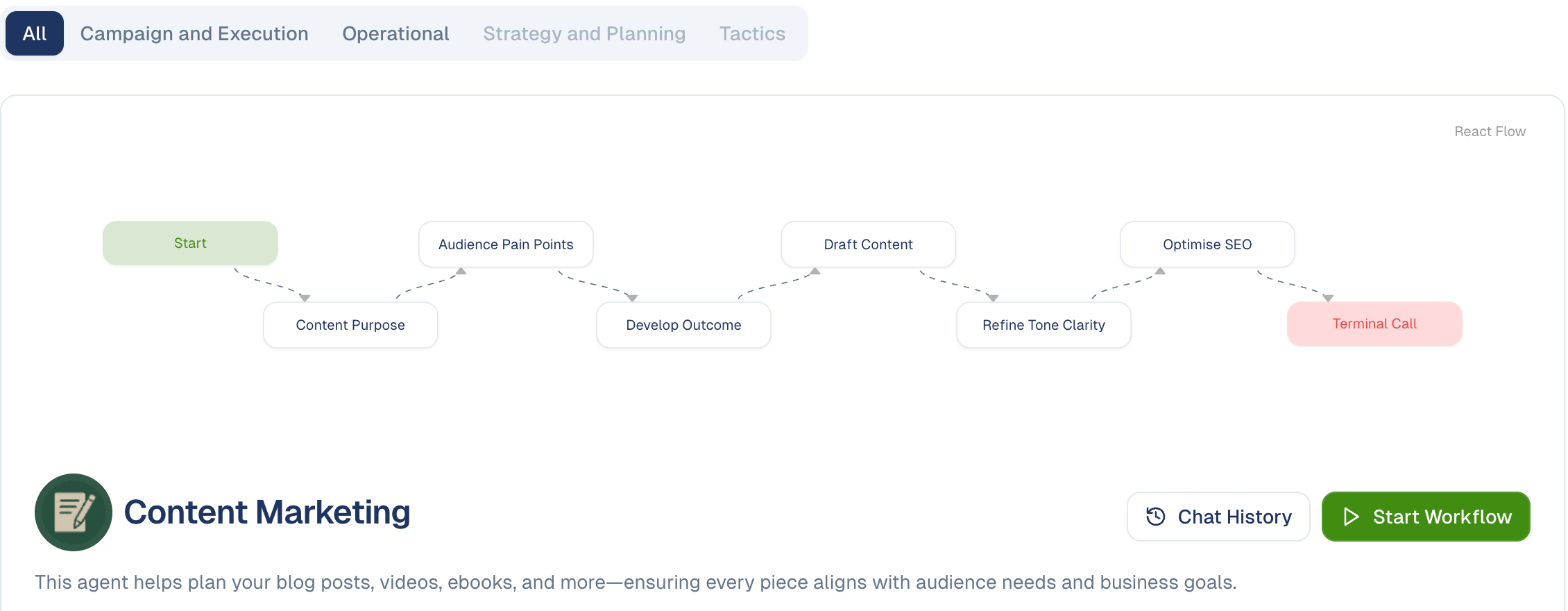
Reading the diagram
Each workflow shows its steps as a flow chart, so you can see what happens before you start it. A company research workflow, for example, runs:
Start → Company Research → Competition Analysis → Competition Ranking → SWOT Analysis
Some workflows fan out and rejoin: they split a question into parts, work on each separately, then merge the findings. That is why they take longer than a single answer and produce a more thorough one.
Read the diagram first
The flow chart tells you what the agent will actually do. If the steps do not match what you need, a different workflow, or a chat agent, may suit you better.
Categories
Filter with the buttons under the title: All, Campaign and Execution, Operational, Strategy and Planning, Tactics. A greyed-out category has no workflows in it.
Use Search agents… to find one by name.
Chat History
Chat History on each workflow holds previous runs. Check it before starting a fresh one: you may have run the same analysis last month.
Good to know
- Results are not instant. These run several steps in sequence; expect to come back to them.
- Run one every week? Schedule it with an Agent run task in the Scheduler.
- Check the output before acting on it. A workflow producing competitor analysis is a starting point for your judgement, not a decision.
Still stuck? Contact support.