Text to Speech
Turn written copy into spoken audio, in a voice you choose.
What it's for
Some audiences listen rather than read. Text to Speech produces audio from your written copy: video voiceovers, social clips, accessible versions of written content, and audio ads.
You write the script; GoodBards reads it aloud.
Before you start
- Your plan. Text to Speech is included in the Lite, Pro and Full plans.
- Credits. Each clip counts against your monthly AI credits. See Usage & Billing.
How to generate audio
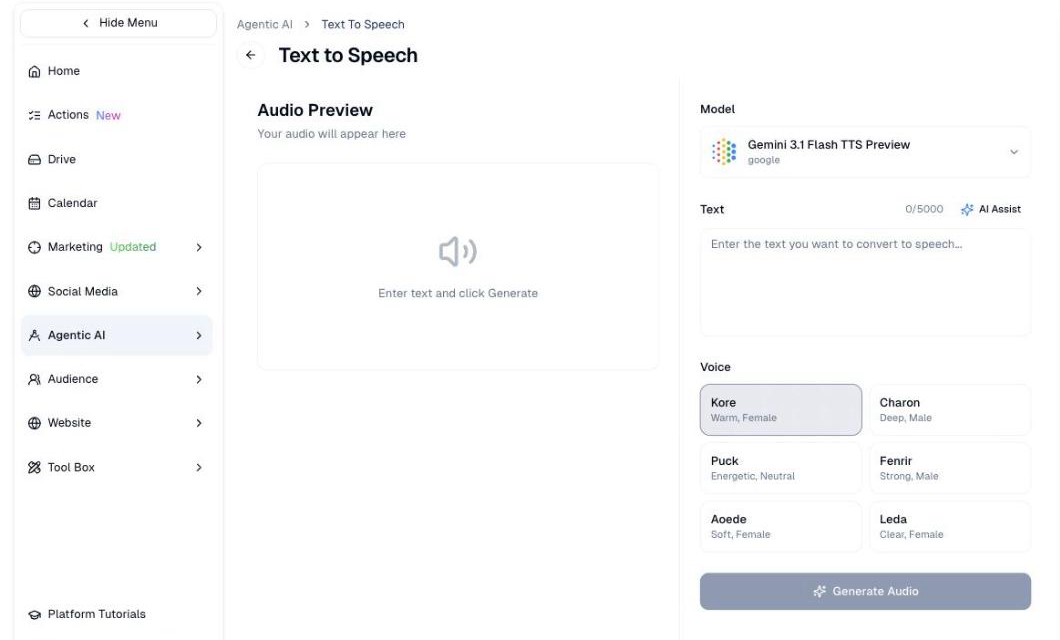
- In the sidebar, choose Agentic AI → Text to Speech.
- Paste or type your script into Text. The limit is 5,000 characters.
- Pick a Voice.
- Choose Generate Audio.
Your audio appears under Audio Preview on the left.
Choosing a voice
Each voice has a short description of how it sounds:
| Voice | Character |
|---|---|
| Kore | Warm, female |
| Charon | Deep, male |
| Puck | Energetic, neutral |
| Fenrir | Strong, male |
| Aoede | Soft, female |
| Leda | Clear, female |
Match the voice to the content. Energetic suits a product launch; warm or soft suits something more considered.
Pick one voice and stay with it
If audio becomes a regular part of your marketing, using the same voice each time makes it recognisable. Switching voices between clips sounds like different companies talking.
Writing for the ear
Copy that reads well on a page often sounds wrong aloud. Shorter sentences work better, and it is worth reading your script out before generating it.
Let AI Assist adapt your copy
AI Assist, above the text box, turns written copy into something that sounds natural spoken.
Good to know
Say if the audio is synthetic
Where your audience would reasonably expect a real person, tell them the voice is generated.
- 5,000 characters is roughly five minutes. Longer scripts need splitting.
- Listen before you publish. Check names, acronyms and any local place names: these are where pronunciation goes wrong.
Still stuck? Contact support.